
SEO Tools for Client Onboarding: Evaluate Access, Baselines and Project Boundaries
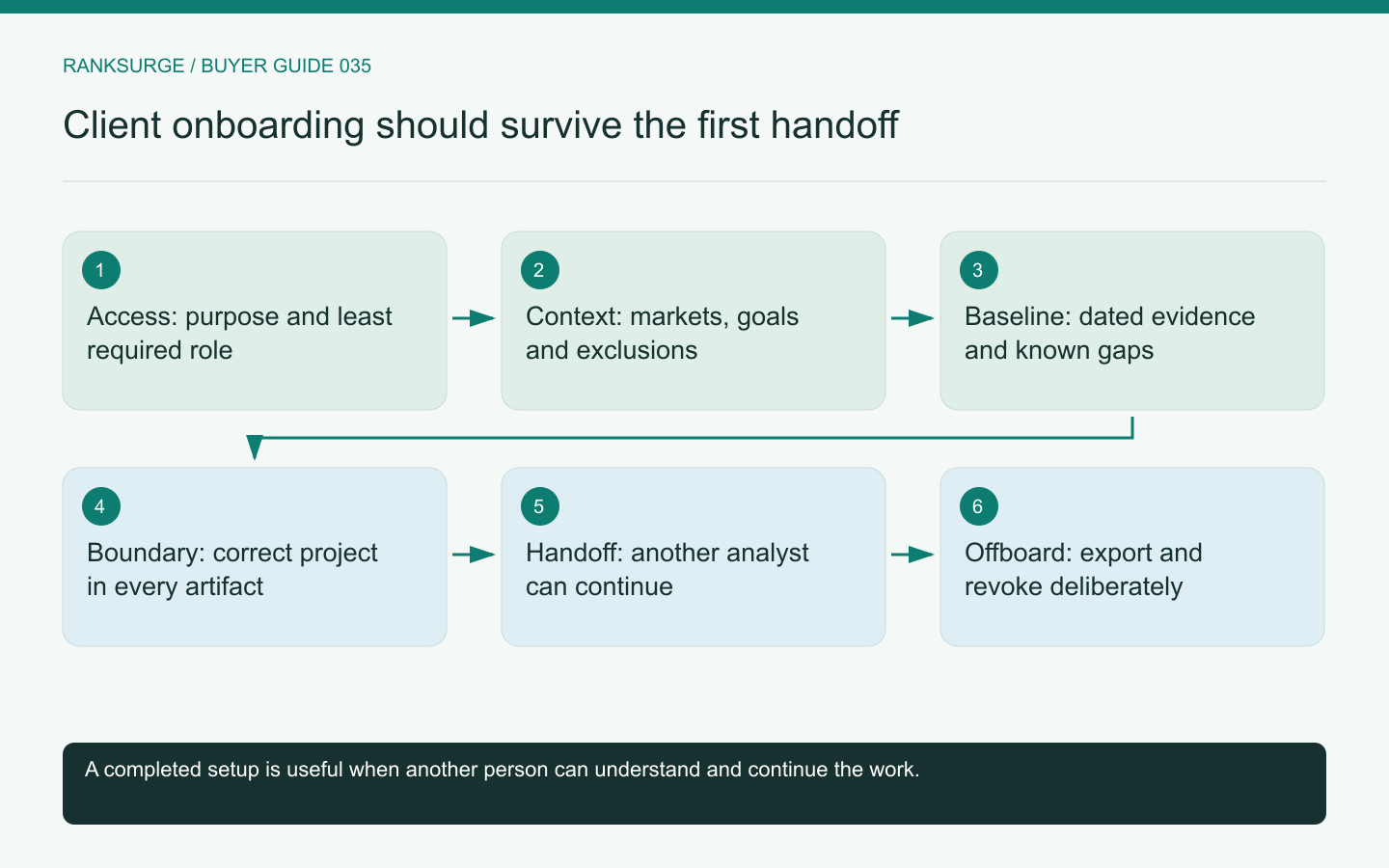
Evaluate SEO tools for client onboarding with access boundaries, baseline capture, project context and an offboarding rehearsal before agency rollout.
TL;DR
- Decide early to record access, client goals and a pre-engagement site state so later reports have a trustworthy baseline and business context for the engagement.
- Use concrete onboarding methods: map needed systems and permissions, run a trial project, and rehearse handoffs to ensure project context, connected data and roles are clear.
- Treat a dated, scoped baseline as the success check and verify it by asking another analyst to reproduce a finding; an honest incomplete baseline beats an implicit, incorrect one.
Treat onboarding as the start of a durable record
An SEO tool for client onboarding should help an agency establish what it can access, what the client wants and what the site looked like before work began. Creating a project and importing a keyword list is not enough. The first few days determine whether later reports have a trustworthy baseline and a clear business context.
Use one representative client as the trial case. Choose a project with a real website, a defined service scope and more than one stakeholder. Evaluate whether the tool keeps those details understandable as research, reporting and technical work begin.
Map access before requesting it
List the systems needed for the engagement and the reason for each connection. Search Console access, website analytics, a public crawl and CMS editing are different permissions. Do not request broad administrative control merely because it makes the setup checklist shorter.
Google's Search Console permissions documentation distinguishes ownership and user access. Use the relevant platform's documented roles when planning client access rather than treating every invitation as equivalent.
Ask the SEO-tool vendor how connected accounts are scoped and revoked. The agency should know whether a connection belongs to an individual staff member, a shared organisation or a particular project. That distinction affects continuity when someone changes roles.
Capture the client's actual commercial context
Record the products or services the client can sell, the markets they serve and the actions they want visitors to take. Include known exclusions. A business that does not serve a region should not receive an onboarding keyword plan built around that region's apparent volume.
Have the client identify existing high-value pages and explain which competitors matter commercially. Search competitors may differ from sales competitors, so preserve both concepts. This prevents a later analyst from interpreting an unrelated high-ranking publisher as the client's entire competitive market.
RankSurge's project context tools can retain business goals, positioning, competitors and key pages. Evaluate whether the resulting context is accurate and easy for the next team member to review. Saved text is useful only when someone maintains it as the client changes.
Related reading: The Best Open Source SEO Tools in 2026.
Build a baseline with a known date and scope
Capture the relevant first-party search period, priority queries, important page observations and existing technical concerns. Record the collection date and any unavailable sources. An incomplete but honestly labeled baseline is more useful than a report that implies every system was connected from day one.
Keep inherited issues separate from changes introduced during the engagement. If the client already had a redirect problem or incomplete analytics, document that without using it as an excuse for every later result.
Use a small verification exercise: ask another analyst to reproduce one baseline finding from the saved evidence. If they cannot identify the page set, filters or date range, improve the onboarding record before collecting more data.
Test project boundaries with two clients
Create two harmless trial projects with deliberately similar keyword names. Ask a staff member to switch between them and confirm which context, reports and connected data are active. Similar names make accidental cross-project assumptions easier to notice.
Review exports and shared links as well as the main interface. A dashboard can enforce project boundaries while an exported report accidentally includes the wrong client name or cached filter. The evaluation should cover the artifacts your agency actually sends to customers.
Do not assume RankSurge or any other platform supports a particular granular role model without testing the current account configuration. Record unsupported access requirements as gaps rather than solving them by sharing an owner's credentials.
Related reading: SEO for Startups: A Founder’s Handbook.
Rehearse a handoff and an offboarding
Have the initial analyst hand the project to a colleague using only the saved onboarding record. The colleague should understand the goal, access status, baseline, open questions and first agreed actions. Missing context becomes an explicit improvement to the process.
Then rehearse the end of an engagement. Identify what the client receives, which access is removed and what historical records the agency retains under its agreement. Exportability matters most when it is tested before the client needs to leave.
A vendor's cancel button does not answer all these questions. Client ownership of data, staff access and subscription ownership are separate concerns that should be mapped deliberately.
Choose software that reduces repeated explanation
A lightweight platform may be sufficient when the agency has a disciplined onboarding document and a small client set. A more integrated tool can be valuable when it preserves context, permissions and evidence across many handoffs. Compare the ongoing process, not only the speed of the first import.
The strongest trial ends with a project another colleague can safely continue. They should know what the agency promised, what evidence exists and which decisions still require client input. That clarity is the real value of an onboarding tool; a completed setup checklist is only its visible trace.