
SEO Research Export Formats: Evaluate Rows, Context and Reproducibility
Compare SEO research export formats with a practical round-trip test for identifiers, metric context, missing values and reproducible page decisions.
TL;DR
- Choose the export that preserves the information the next person needs: define a concrete handoff, then prefer formats and fields that keep the required evidence for that task.
- Evaluate exports by inspecting rows plus surrounding context and by testing with fixtures (non‑English queries, punctuation, empty metrics) to ensure values survive the handoff intact.
- Check limits and reproducibility: confirm completeness across pagination and rehearse a round trip so someone without platform access can reproduce a page decision from the export.
Start with what the next person must do
SEO research export formats matter because the work often continues outside the tool that collected the data. An analyst may need to compare sources, a writer may need a brief or a client may need a durable record. The best export is the one that preserves the information required for that next task.
Before comparing products, choose a concrete handoff. For example, export a shortlisted keyword set so another analyst can explain why each term maps to an existing page or a proposed new one. A file containing only keyword and volume may be too narrow for that job even if it opens perfectly.
Compare rows with their surrounding context
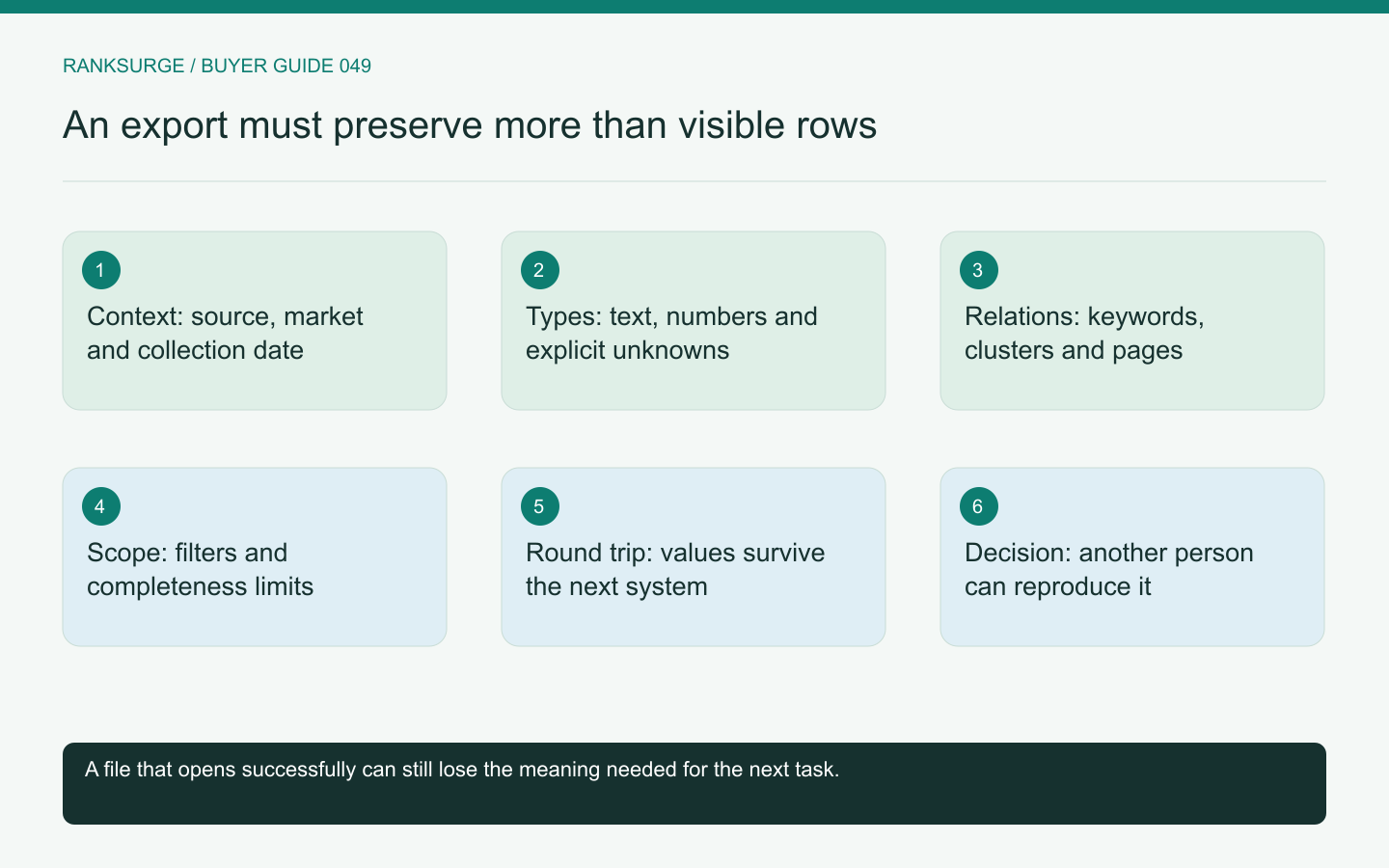
A useful research record can include query, market, language, source, collection date, metric definitions and editorial decisions. Not every export needs every field, but the omitted context should be deliberate.
Ask whether filters and selected scope are saved in the file or supplied in an accompanying manifest. A thousand rows from a filtered search are not the same dataset as every available keyword for a domain. The recipient should not have to infer that difference from the filename.
RankSurge's MCP documentation describes research records and saved project context. When evaluating exports from any interface or client, inspect what actually survives the handoff rather than assuming all visible context is included automatically.
Related reading: The Best Open Source SEO Tools in 2026.
Related reading: SEO for Startups: A Founder’s Handbook.
Use CSV, spreadsheets and JSON for different needs
A CSV is broadly portable for flat rows, but its simplicity means conventions such as encoding, delimiters and empty values need care. A spreadsheet can package several related tables and review notes, while also introducing formulas or formatting that another system may ignore.
JSON can preserve nested structures and explicit null values more naturally, but it may be less convenient for a nontechnical reviewer. It also needs a documented schema if another application will ingest it reliably.
Do not choose the most elaborate format by default. Compare the next user's task and the structure of the actual data. Sometimes a clean flat export plus a short context file is easier to maintain than a complex workbook nobody understands.
Test difficult values before buying
Create a fixture with a non-English query, punctuation, an empty metric and a long URL. Export it, open it in the intended destination and compare the values with the original records.
Check that unavailable metrics remain distinguishable from zero. Inspect identifiers that resemble numbers and ensure the destination does not alter their meaning. A file can be syntactically valid while a spreadsheet application interprets a field in an unintended way.
Also test multiline notes if your workflow relies on them. A broken row boundary can quietly associate one keyword's reasoning with another keyword, which is more damaging than an obvious import error.
Preserve relationships between records
Keyword research often connects queries to clusters, pages and competitor observations. A flat export may repeat some fields or use identifiers to refer to separate tables. Ask how those relationships are represented and whether another analyst can reconstruct them.
Use a fixture where two keywords belong to one page and one keyword remains unassigned. The export should not imply that every keyword requires a separate page or that an empty assignment is an error.
Keep the reason for a decision where practical. A rejected keyword can be valuable institutional knowledge if the file preserves that it was unsuitable because the product did not support the requested task.
Verify completeness and pagination
Export a known set larger than the interface's first visible page. Compare expected and actual counts, then inspect a few records near the boundaries. A download button may export selected rows, filtered rows or the entire dataset; those are different promises.
First-party APIs can have their own limits. Google's Search Analytics query documentation explains that returned data is subject to service constraints and is not necessarily every possible row. An export cannot recover information the source did not return.
Record those limits alongside the file so a later reviewer does not mistake a bounded dataset for a complete search history.
Rehearse a round trip and an exit
Import the fixture into the system that will consume it, make a harmless review annotation and export it again if that is part of the workflow. Inspect whether stable identifiers and important context remain intact.
Then ask someone without access to the original platform to reproduce one page decision. They should be able to identify the query evidence, the relevant market and the reason for the recommendation.
Choose the tool whose export supports that handoff with the least avoidable ambiguity. File format is only the container. The purchasing value lies in preserving enough meaning that research remains useful after it leaves the dashboard.