
SEO Change Logs: Record Enough Context to Investigate a Traffic Change
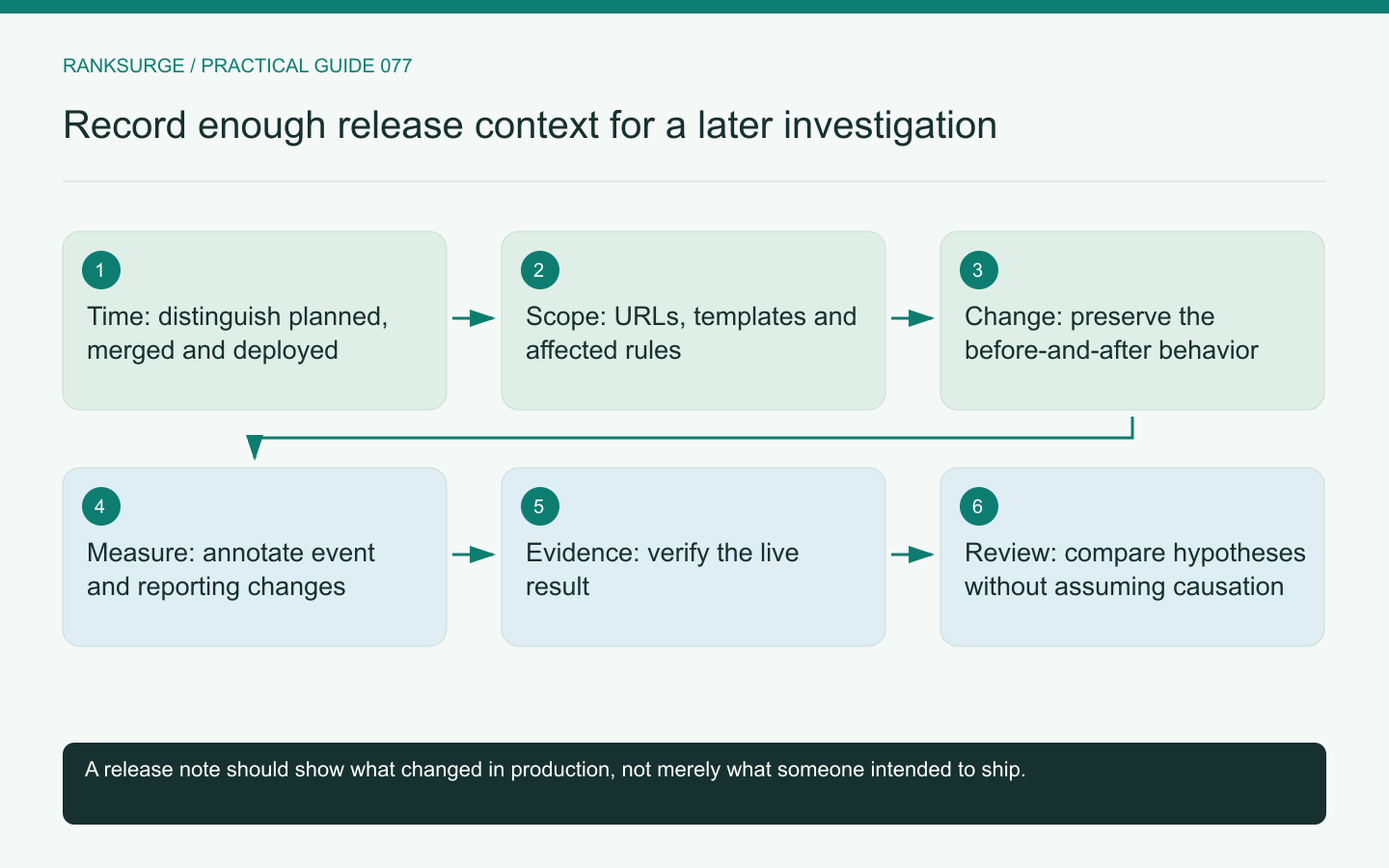
Create an SEO change log with release times, affected URLs and expected behavior so later traffic investigations have evidence beyond memory.
TL;DR
- Keep a concise SEO change log that records what actually reached production so a future investigator can attribute search-performance shifts to concrete releases rather than vague edits.
- Record the practical details at ship time—release time, affected pages or templates, intended behavior and verification evidence—so scope and expected outcomes can be reconstructed during an investigation.
- Treat the log as testable evidence, not a performance claim: include measurement changes, require verified URLs/timestamps, and consult the log before attributing traffic shifts to external events.
Record the change while its context is still known
An SEO change log should help a future investigator understand what actually reached production. “Updated website” is too vague to explain a later shift in search performance.
Record the release time, affected pages or templates, intended behavior and evidence that the change was deployed. The log is not a diary of every editing session. It is a concise record of changes that could matter to how pages are discovered, understood or used.
Write entries when the work ships, while the owner still knows the scope and can distinguish a planned change from a completed one.
Separate intention from observed deployment
A merged code change, a CMS save and a production release can happen at different times. Note the stage that matters for the investigation and verify the user-facing result.
For an illustrative documentation migration, the code may be merged on Monday while the new routes become public on Wednesday. A traffic movement on Tuesday should not be attributed to the public route change without additional evidence.
Keep the deployment identifier or relevant release record where available. A precise timestamp and a verified affected URL are more useful than an approximate recollection that “something changed that week.”
Describe the affected scope
List representative URLs and the rule that defines the full affected set. A template change can affect hundreds of pages even when only one file was edited.
For the documentation example, record whether the change involved all guides, one language section or only pages with a particular layout. Include redirects, canonical annotations and navigation changes if they were part of the same release.
Do not require every entry to contain an exhaustive URL dump. The goal is a scope another person can reconstruct accurately, with representative checks that demonstrate the rule.
Preserve the before-and-after promise
Write what the change was intended to improve and what would count as correct behavior. For a title update, keep the previous and new wording. For a redirect, record the source and intended destination. For a navigation change, explain which reader task should become easier.
This turns the log into evidence for a hypothesis rather than a list of activity. It also helps identify whether the implementation achieved its immediate purpose before discussing any search effect.
Avoid writing a performance claim into the change description before the outcome has been measured. “Clarified the supported integration” is a fact about the edit; “increased qualified traffic” requires later evidence.
Include measurement changes
Analytics, event definitions and reporting filters can change the numbers even when the underlying audience behavior remains similar. Record these changes alongside content and technical releases.
For example, correcting a duplicate signup event can reduce the reported count while improving measurement accuracy. Without an annotation, a team might wrongly conclude that a recent article update harmed conversions.
Document the event or report affected, the old and new definitions and whether historical data was reprocessed or remains under the earlier definition. This prevents unlike measurements from being presented as one continuous series.
Keep external observations separate
A search update, competitor release or seasonal event may be relevant context, but it is not a site change your team performed. Label it as an external observation with a dated primary source where possible.
Google's traffic-drop investigation guidance is useful for considering different explanations. A log should make those possibilities easier to compare, not automatically blame the nearest event on the calendar.
Use phrases such as “occurred during the same period” until the evidence supports more. Temporal proximity is a clue, not a complete causal argument.
Use a compact entry format
A practical entry can contain: release time, owner, scope, change, expected behavior, verification evidence and follow-up question. Add a rollback or correction reference when relevant.
For the documentation migration, the follow-up might be whether intended destinations remain accessible and whether search reporting begins reflecting the new URLs. The immediate verification should already confirm the routing and content behavior under the team's control.
Keep sensitive operational details out of a broadly shared log. Link to restricted evidence when necessary rather than copying credentials or private customer data into the entry.
Review the log before rewriting the story
When a traffic change appears, consult the log before assembling explanations from memory. Compare the affected scope and timing with the observed pattern, then test plausible hypotheses.
A useful entry may also show that a suspected release affected a different section and is unlikely to explain the change. That negative evidence can save substantial investigation time.
RankSurge research can provide performance context, but a maintained change log gives the team the production history needed to interpret it. The result is a more disciplined investigation in which facts, hypotheses and outcomes remain distinct.
Related reading: SEO for Startups: A Founder’s Handbook.
Related reading: How to Prompt Claude Code for SEO.