
Search Console Date Comparisons: Control for Weekdays and Incomplete Data
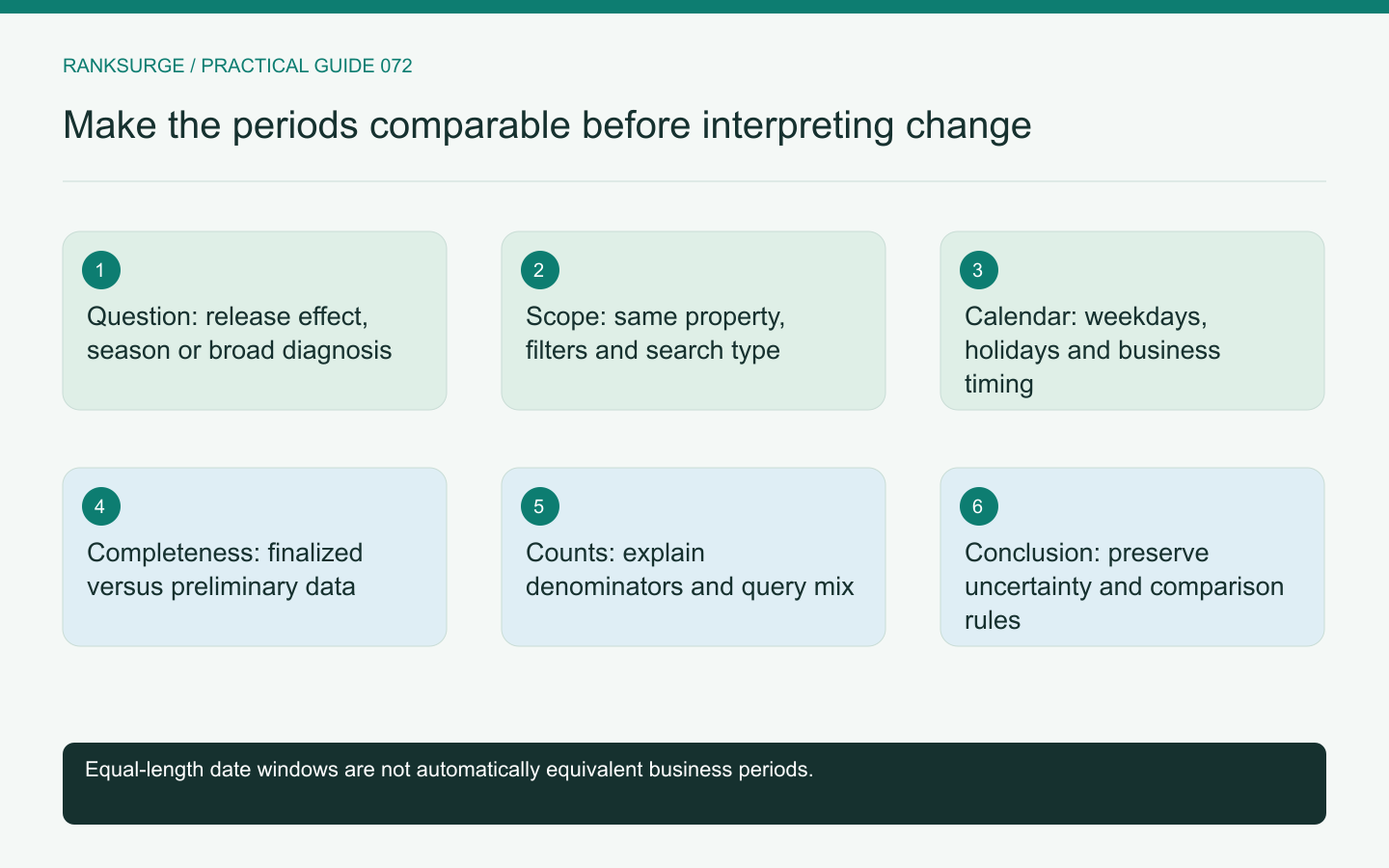
Compare Search Console periods with consistent scope, complete data and calendar context so weekday mix or seasonal timing does not masquerade as an SEO change.
TL;DR
- Decide what the date comparison is meant to test, choose the question before selecting dates, and record the proposed comparison so the analysis answers a stated question rather than fitting a preferred story.
- Control for weekday composition and incomplete reporting: compare complete weeks or retain month boundaries while explaining calendar differences, and never present an unfinished interval beside a full period as equal exposure.
- State conclusions with explicit limits: name the periods, scope and main observation, explain calendar or data limitations, and keep the documented comparison definition stable for reproducibility.
Decide what the comparison is meant to test
A date comparison should answer a stated question: did an important page change after a release, is a decline broad or isolated, or does the current season resemble the previous one? Different questions require different comparison windows.
Choose the question before selecting the dates. Otherwise it is easy to move the window until the chart tells a preferred story. Record the proposed comparison and the reason it is appropriate for the decision.
For a release investigation, note when the release actually reached production and which pages it affected. A deployment at the end of a reporting day cannot reasonably explain the whole day’s earlier behavior. That timestamp gives the analysis a concrete boundary without implying that every later movement was caused by the release.
The aim is not to remove all uncertainty. It is to avoid obvious mismatches that make the resulting interpretation unreliable.
Keep the report scope unchanged
Use the same property, search type, filters and grouping unless the analysis explicitly concerns a change in scope. Save those settings with the export or report link.
For an illustrative software site, comparing all-country traffic in one period with a single-country view in another would confound geography with time. Similarly, a page filter accidentally retained from a previous investigation can make a site-wide chart look like a sudden collapse.
Check these basic settings before interpreting a percentage. They are faster to verify than a speculative explanation involving algorithms or competitors.
Account for weekday composition
A business-oriented site may have a different pattern on weekdays and weekends. Two equal-length periods can still include different combinations if they are short or selected around an unusual boundary.
For a simple operational review, compare complete weeks when that fits the question. If the business requires calendar-month reporting, retain the month boundaries but explain relevant calendar differences rather than pretending every month has identical working days.
Use the site's observed pattern, not a universal assumption that all B2B traffic disappears on weekends. The calendar check is a way to test context, not a predetermined explanation for every change.
Avoid comparing complete periods with incomplete ones
Recent reporting can still be preliminary. Google's performance-report guidance identifies that the newest data may change as collection continues.
For a recurring report, define a consistent cutoff or finalized-data policy. If the latest period is intentionally incomplete, label it prominently and compare it with an equivalent portion where appropriate.
A month-to-date count should not be presented beside a full previous month as if the raw totals represented equal exposure. State the elapsed period and avoid turning an unfinished interval into a confident growth or decline claim.
Consider seasonal and event context
A release review and a year-over-year seasonal comparison answer different questions. Use each deliberately rather than expecting one date window to control for every influence.
For an illustrative training platform, enrollment timing may shift around holidays or institutional calendars. A simple previous-month comparison could mix a normal seasonal change with the effect of a page update.
Google's traffic-drop investigation guide discusses examining patterns and possible causes. Use the broader context to guide investigation, while retaining the distinction between an observed correlation and a demonstrated cause.
Compare counts before explaining rates
Look at clicks and impressions alongside CTR and average position. A change in the mix of visible queries can move a rate even when a particular audience behaves similarly.
For example, a page gaining broader impressions can show a lower CTR while receiving more clicks. A period comparison that reports only the rate can frame increased visibility as an unqualified failure.
Write down what changed numerically and what interpretation remains uncertain. This makes the report more useful to decision-makers than a colored arrow with no denominator.
Segment only to answer a hypothesis
If the overall pattern changes, inspect relevant page groups, countries or devices that could explain the movement. Choose the segmentation based on a plausible question, such as whether a mobile layout release affected an important landing page.
Avoid repeatedly slicing until a dramatic result appears. Small groups can fluctuate substantially, and an isolated change may not justify a broad conclusion.
Retain the original comparison while adding the diagnostic view. That allows reviewers to see both the overall pattern and the specific evidence used to investigate it.
State the conclusion with the comparison limits
A useful conclusion names the periods, scope and main observation, then explains relevant calendar or data limitations. It can recommend a page inspection or further measurement without pretending the dates alone prove causation.
Keep the documented comparison definition stable for future recurring reports or annotate any intentional change. RankSurge research can help organize the evidence, but a trustworthy date comparison depends on explicit choices that another analyst can reproduce and challenge.
Related reading: The Dark Query Problem: Why Search Console Hides Most of Your Searches.
Related reading: SEO for Startups: A Founder’s Handbook.