
Search Console Canonical Inspection: Compare Declared and Selected URLs
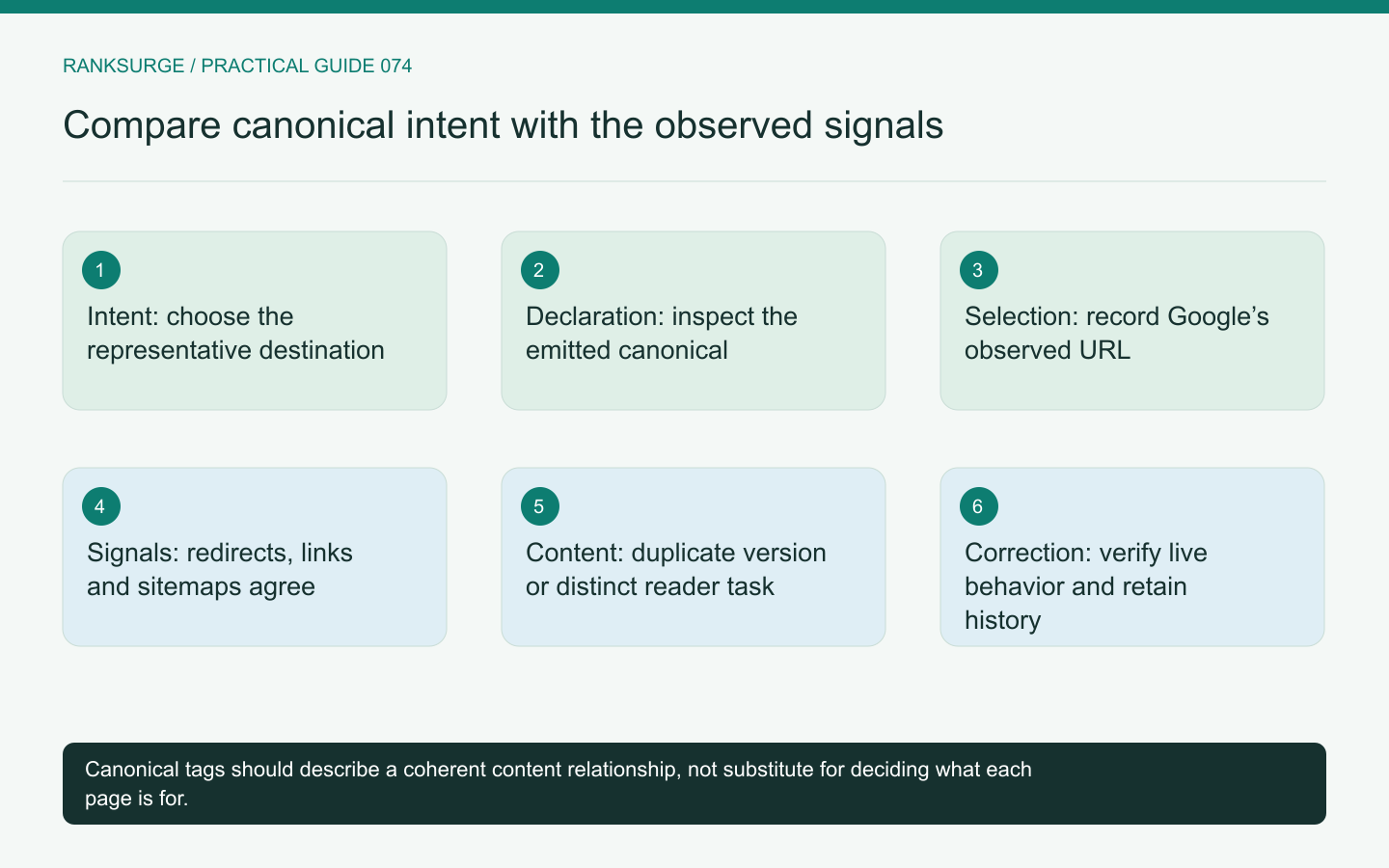
Investigate canonical differences by comparing the intended URL, declared signals and Google’s selected URL before changing templates or consolidating pages.
TL;DR
- Decide which URL should represent the content, then treat a mismatch between the site's declared canonical and Google's selected URL as evidence to investigate rather than proof of arbitrary ignoring.
- Use a focused inspection workflow: open both the declared and the selected destinations, compare status, content and behavior, then review canonical annotations, redirects, sitemap entries and internal links.
- Recognize reporting limits and define a narrow acceptance test: record exact URLs and changes, expect the correct live behavior, then monitor reporting evidence without promising immediate processing times.
Begin with the intended destination
Canonical inspection is easier when the team has already decided which URL should represent a piece of content. Without that decision, a report showing different URLs can become a debate about tags rather than a diagnosis of the site's structure.
Write down the intended destination and the alternatives that should refer to it. Include parameter variants, alternate paths and any old URLs involved in a migration. Keep genuinely different pages separate from duplicates or very similar versions.
The purpose is to understand whether the site's signals and Google's observed selection align with that intended structure.
Distinguish declared from selected
A site can declare a preferred canonical URL, while Google may select a different one. Treat that difference as evidence to investigate rather than proof that one tag is being ignored arbitrarily.
Google's canonicalization documentation explains several signals, including redirects, canonical annotations and sitemap inclusion. These should work coherently instead of pointing toward competing destinations.
Do not assume that adding the same tag in more places will resolve a contradictory site structure. First inspect what the relevant URLs actually serve and how users and crawlers encounter them.
Inspect the declared page and the selected page
Open both destinations and compare status behavior, visible content and the intended page role. A seemingly similar URL may redirect, serve an error, expose a different language or contain materially different information.
For an illustrative product guide, the declared canonical might point to a newer path that was never deployed correctly. The older URL may remain the only complete accessible version. The issue is broader than a metadata field.
Also note whether the observation came from the live response, a rendered page or a reporting record. Those views can describe different moments in the lifecycle.
Record the exact URLs and the inspection date. Avoid shortening away parameters or trailing-path differences that may be central to the diagnosis.
Related reading: The Best Open Source SEO Tools in 2026.
Check the signals as a group
Review the canonical annotation, redirects where applicable, sitemap entries and important internal links. Look for contradictions introduced by separate templates or migration changes.
For example, a page may declare the new URL while navigation continues to promote an old equivalent, or a sitemap may include several variants the team intended to consolidate. These observations suggest specific implementation checks.
Do not change all signals blindly. Confirm the intended relationship and make a coordinated plan so the final configuration is understandable and testable.
Separate duplicates from different tasks
Two pages about the same subject are not necessarily canonical alternatives. A product page and a detailed setup guide can share terminology while serving distinct reader needs.
Canonicalizing the setup guide to the product page would not be a sensible general remedy for overlapping keywords if the content is genuinely different. The editorial decision about whether pages should remain separate comes before the technical consolidation choice.
For the product-guide example, compare actual content and purpose. If the old and new URLs are equivalent versions, consolidation may be appropriate. If they answer different questions, clarify their roles instead of treating one as a duplicate by title alone.
Use inspection results within their limits
An inspection result reflects information available to the reporting system at that point. After a change, allow for the fact that the observed state may not immediately match a new deployment.
Keep a record of what was changed and verify the live page independently. A correct live response and a previously recorded selected URL can coexist while the system processes new evidence.
Avoid repeatedly changing tags in response to every short-term mismatch. That makes the history harder to interpret and can introduce new contradictions before the first correction has been assessed.
Define a narrow correction and acceptance test
If the intended canonical target is broken, restore the correct accessible destination. If a template emits the wrong URL, fix that template and inspect representative affected pages. If internal signals conflict, align them with the documented destination.
For each change, write the expected live behavior: the relevant page serves the right content, the canonical points to the intended URL and related routing or sitemap behavior is consistent.
Then monitor the reporting evidence without promising a fixed processing time or a guaranteed traffic recovery. Technical correctness and search performance are related questions, but they are not the same acceptance test.
Related reading: The Dark Query Problem: Why Search Console Hides Most of Your Searches.
Keep the decision with the content record
Store the intended canonical relationship and the reason it exists, especially around renames and migrations. Future editors should understand whether a URL is a duplicate, an old location or a distinct page.
A useful canonical audit ends with a coherent site structure and evidence for the remaining observations. It does not end with a tag added mechanically to every page that shares a keyword. Preserve the reader's correct destination, then make the site's technical signals consistently describe it.