
JavaScript and Site Audits: Understand What Your Crawler Actually Saw
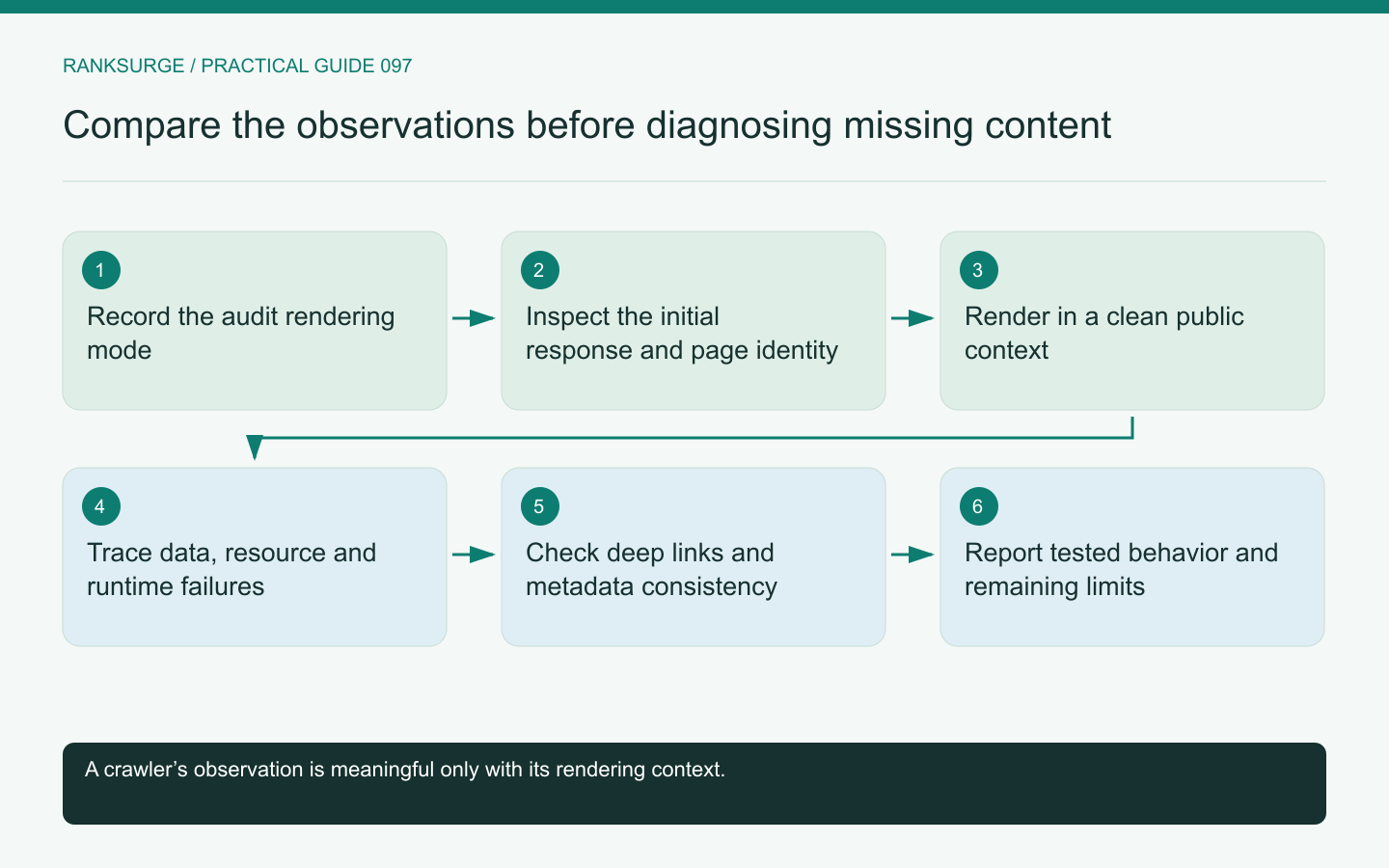
Interpret JavaScript audit results by comparing initial HTML, rendered output and crawler configuration before declaring content or links missing from the website.
TL;DR
- Main decision: determine which version of the page the crawler inspected and interpret missing-content findings in the context of what that crawler actually saw before concluding a problem exists.
- Useful method: capture and record the initial HTML response separately from the rendered result, preserving both observations to diagnose whether content arrives server-side or only after client-side execution.
- Meaningful limit and success check: report the precise evidence boundary and a repeatable test case—document which URLs and rendering mode were used and a validation path for fixes.
Ask which version of the page was inspected
A crawler can inspect an initial HTML response, a rendered page after JavaScript execution or some combination of the two. Those observations may differ substantially on an application-driven website.
Before accepting a missing-content or missing-link finding, identify the audit's rendering mode and the point at which the observation was captured. A tool that never executes the application cannot report everything a fully rendered browser view contains.
That limitation does not automatically make the website healthy. It means the evidence must be interpreted in the context of what the crawler actually saw.
Capture the initial response separately
Inspect the response status, basic HTML, title, metadata and any meaningful content delivered before client-side execution. Record whether the response represents the requested page or a generic application shell.
For an illustrative product route, the initial response may contain a shared layout while the product details arrive later through an API request. A source-only audit could report little content even though a browser eventually displays the product.
Preserve that observation rather than replacing it with a screenshot. The difference between initial and rendered output can be important to diagnosing reliability and discoverability.
Inspect the rendered result under realistic conditions
Use an appropriate rendered check and record failures, blocked resources and timing assumptions. A page that works in a developer's already-authenticated browser may behave differently in a clean session.
Google's JavaScript SEO guidance describes crawling, rendering and indexing as distinct stages. A third-party audit is not a perfect reproduction of that pipeline, so avoid claiming equivalence from one rendered test.
The practical question is whether the important content and links are available reliably in the tested public context, and which dependencies prevent that when they are not.
Separate missing data from a rendering failure
An empty component may result from a failed API request, an access restriction, a JavaScript error or genuinely absent content. Those causes require different fixes.
Inspect the relevant network and runtime evidence where available. For example, a product API returning an error can leave a loading placeholder indefinitely even though the main document returns successfully.
Do not turn every empty component into a content-writing task. The correct owner may be the application team responsible for fetching and displaying existing data.
Check navigation as navigation
A visible button can look like a link to a person while relying entirely on a script interaction. Inspect whether the important routes are represented through discoverable link elements with appropriate destinations.
Also test direct navigation to a nested route. An application that works only after starting from the homepage can fail for search visitors arriving at a deep link.
For a documentation example, open a specific guide in a new clean session and reload it. Confirm that the intended content and route state survive without requiring a previous click through the application.
Compare metadata before and after execution
Inspect whether titles, canonical declarations and indexing directives remain consistent when JavaScript runs. A fallback value that changes to a conflicting destination can complicate the site's signals.
Record the exact sequence observed rather than assuming the last value seen by your browser is the only value any crawler will encounter. The implementation should make the intended page identity clear and stable.
A fix may involve server-rendered metadata, application state or template logic. Choose the change based on the actual source of the inconsistency, not on a generic preference for one framework.
Test failure states as well as the happy path
Review a missing product, an API timeout and a route whose resources are unavailable. Confirm that the user sees an understandable outcome and that the response behavior matches the application's intended handling.
A generic successful response containing only “not found” can be a different audit concern from a valid page with delayed content. Preserve those distinctions in the report.
Also test whether blocked optional analytics or advertising resources prevent the core content from rendering. The primary page should not depend unnecessarily on unrelated integrations to become usable.
Preserve a repeatable test case
Save the exact route and the conditions that reproduced the discrepancy. A report saying only “JavaScript content missing” is difficult to act on. Include the expected content, observed output and relevant failed dependency so the implementation team can confirm the same problem before and after its correction.
Report the evidence boundary clearly
State which URLs were checked, which rendering mode was used and which outputs differed. Include representative initial and rendered observations rather than presenting a single unexplained content score.
If RankSurge's available audit mode does not answer the rendering question, use a suitable complementary check and record that limitation. Do not assume every crawler supports every application behavior.
The final recommendation should identify the dependency or output that needs correction and a repeatable validation path. A useful JavaScript SEO audit explains the page's actual behavior instead of declaring all client-side content invisible or all browser-visible content safely discoverable.
Related reading: The Best Open Source SEO Tools in 2026.
Related reading: SEO for Startups: A Founder’s Handbook.