
Branded vs Non-Branded Search: Build a Filter You Can Explain
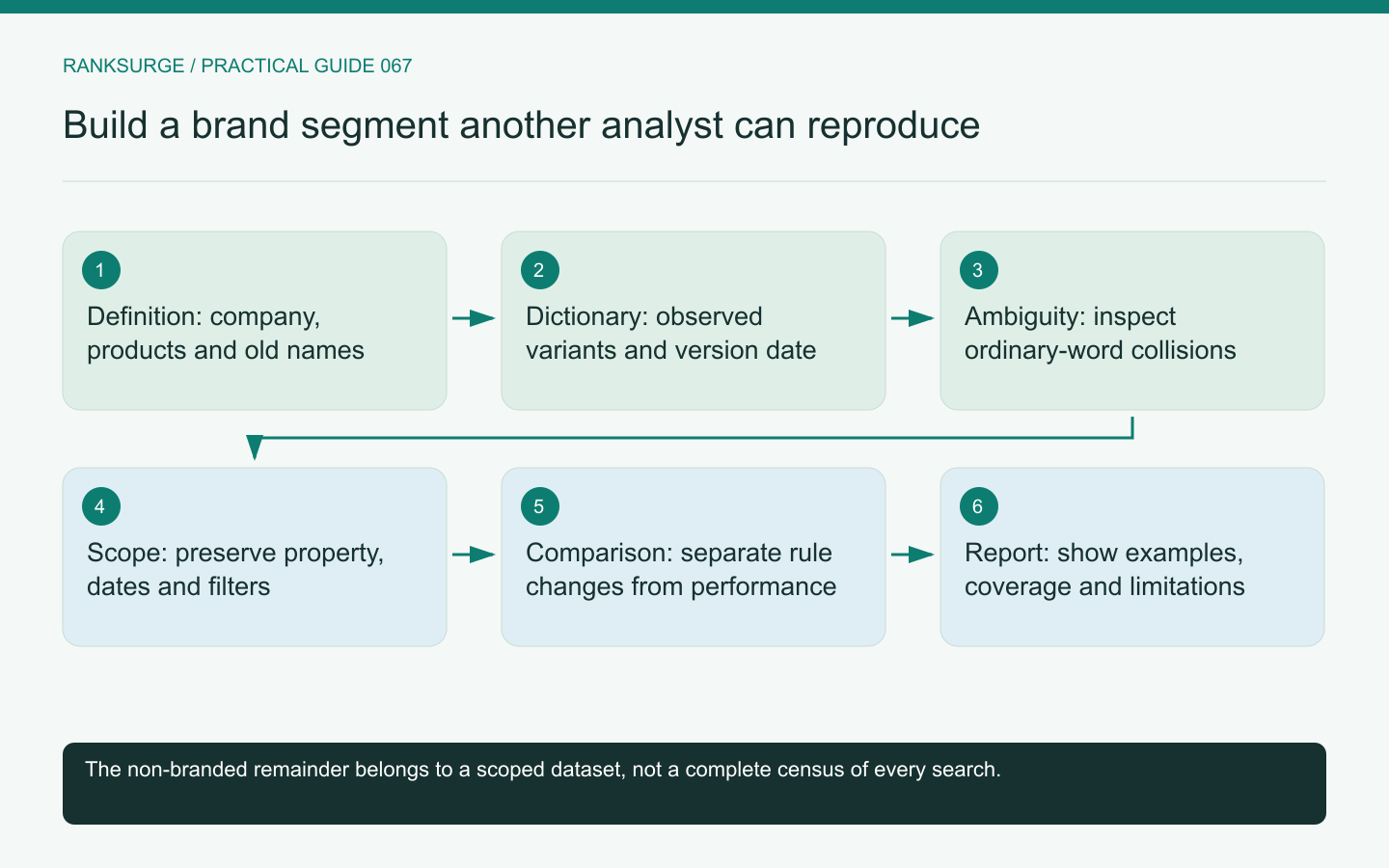
Build explainable branded and non-branded search segments with a versioned term dictionary, ambiguous-query review and clear limits on visible query coverage.
TL;DR
- Decide and publish a clear business definition of “branded” for the report, so others can reproduce and understand which searches were included and why.
- Build a small, versioned dictionary and acceptance set to test rules against representative examples before release, preserving an auditable record of recognized names and edits.
- Treat ambiguous queries and classification separately from the data export, and check changes by inspecting both numerator and denominator so reporting edits aren’t mistaken for performance shifts.
Define what branded means for this report
Branded search reporting sounds simple until a product name is also an ordinary word, a company has renamed itself or several products share one domain. Begin by writing the business definition the report will use.
A practical definition might include the current company name, product names and clearly navigational domain variants. Decide separately whether old names, founder names and product-plus-competitor comparisons belong in the branded segment.
There is no benefit in hiding these choices inside an unexplained filter. The report should let another analyst understand which searches were included and why.
Related reading: SEO for Startups: A Founder’s Handbook.
Create a small versioned dictionary
Maintain the recognized names, common spacing variations and verified misspellings in a simple record. Include an effective date and the reason for additions.
For an illustrative product called Cedar Desk, obvious candidates might include “cedar desk login” and the product's domain. But “cedar desk furniture” may refer to a physical desk rather than the software. A substring match on “cedar” could collect many unrelated searches.
Use these ambiguous examples as tests for the filter. The dictionary should reflect observed language and product context, not an ever-expanding list of guesses.
Before releasing a new rule, run a small acceptance set containing a clear brand query, an ordinary-word collision, a domain variant, an old product name and a competitor comparison. Save the expected classification beside each example. A later filter edit should either preserve those expectations or document the intentional change.
Keep ambiguous queries visible
Allow an uncertain category during review rather than forcing every phrase into a confident binary classification. Some queries genuinely cannot be interpreted from the text alone.
For the Cedar Desk example, “cedar desk price” could require inspection of the query context and current results. Even then, the analyst should avoid claiming to know the intention of every individual searcher.
In the final report, explain whether ambiguous rows were excluded, manually classified or retained in a separate segment. Consistency matters more than making the totals look perfectly tidy.
Separate classification from the data request
First establish the report scope: property, dates, search type and relevant filters. Then apply the documented classification to the available query data.
The Search Console API reference describes query filters and grouping options. Verify the behavior of the method you use instead of assuming that a filter in a spreadsheet, a regular expression and an API operator all match text identically.
Keep the filter expression or rule version with the export. A screenshot of the resulting percentage is insufficient for someone who needs to reproduce the analysis later.
Related reading: The Dark Query Problem: Why Search Console Hides Most of Your Searches.
Handle renames as a time-series decision
When a product changes name, both old and new branded searches may remain relevant. Decide how to present them without making a rename look like an abrupt change in non-branded demand.
One useful view is a combined brand segment with separate old-name and new-name subgroups. Another is a clearly annotated transition report. Choose the approach that answers the business question and keep the definitions stable within each comparison.
Do not silently remove the old name from the filter and compare the new result with last month's broader definition. That would mix a classification change with a performance change.
Avoid treating the remainder as a complete discovery audience
The rows not classified as branded are the non-branded portion of the visible, scoped dataset under your chosen rules. They are not automatically every non-branded search the site received.
Google's performance reporting documentation is the appropriate reference for understanding the underlying report. Preserve its coverage limitations in your interpretation instead of presenting a filtered export as a perfect census.
Also distinguish queries mentioning competitors from truly generic category queries. Both may be non-branded for your company, but they can represent different evaluation stages.
Review changes within comparable segments
When the branded share changes, inspect both the numerator and denominator. Branded clicks could remain stable while non-branded exposure grows, or a campaign could increase branded searches without improving category visibility.
For an illustrative report, write the explanation in terms of observed counts and scope rather than declaring that a higher branded share is always better or worse. The desired mix depends on the business question.
Keep classification updates separate from performance notes. If the dictionary changed, either rerun the comparison consistently or clearly mark the break in the series.
Publish the definition beside the chart
The final report should include the term dictionary version, scope, treatment of ambiguous queries and a concise statement of limitations. Add a few representative included and excluded examples so a reviewer can spot mistakes quickly.
RankSurge research can help organize the evidence, but the reporting value comes from a segment people can explain. A modest, transparent classification is more useful than a polished branded percentage whose meaning changes whenever someone edits an undocumented filter.